![SO-logo_line_RGB.png]](https://knowledgebase.smartocto.com/hs-fs/hubfs/SO-logo_line_RGB.png?height=40&name=SO-logo_line_RGB.png)
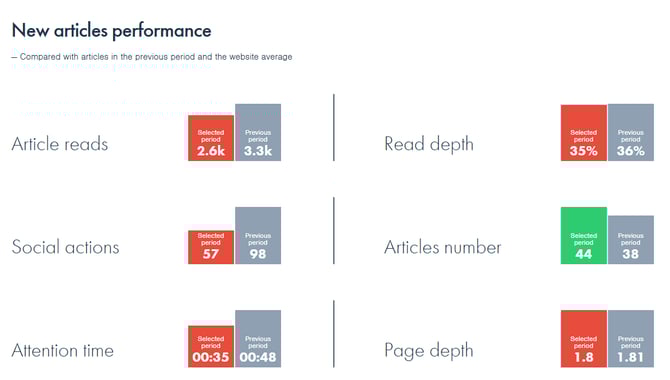
The New articles performance panel with green and red bars show average stats per article for the selected period and for the articles published in that selected period, taking into consideration all the traffic that these articles received up until now (the data is updated every 2 to 3 hours).
Those stats are compared with the Previous period - the previous period being the same length as the selected one, but in the past (e.g. Monday to Sunday of last week is compared with 7 days before those dates). The previous period (grey bars) takes into account all articles published in that previous period and all the traffic they have gathered up until now.
Example
If you have stats for Monday, July 1st, the data is compared with Monday, June 24th (same day last week). Today is Wednesday, July 3rd, and you are visiting the smartocto Insights app around 2 pm. You are going to the New article performance panel after selecting July 1st in the date picker.
The Selected period stats you see (red and green bars) take into consideration:
The Website average can be seen next to the bars once you go into the individual section and author pages.
The metrics you see there are mostly based on average values per article:
Those stats are compared with the Previous period - the previous period being the same length as the selected one, but in the past (e.g. Monday to Sunday of last week is compared with 7 days before those dates). The previous period (grey bars) takes into account all articles published in that previous period and all the traffic they have gathered up until now.
Example
If you have stats for Monday, July 1st, the data is compared with Monday, June 24th (same day last week). Today is Wednesday, July 3rd, and you are visiting the smartocto Insights app around 2 pm. You are going to the New article performance panel after selecting July 1st in the date picker.
The Selected period stats you see (red and green bars) take into consideration:
- all articles published on July 1st
- all traffic that these articles generated from when they were published (July 1st) until now (July 3rd, around 2 pm)
The Previous period stats you see (grey bars) take into consideration:
- all articles published on June 24th
- all traffic that these articles generated from when they were published (June 24th) until now (July 3rd, around 2 pm)
The Selected period is being compared with the Previous period (if the numbers are higher than in the previous period, the bar will be green, and if not, the bar will be red).
The Website average can be seen next to the bars once you go into the individual section and author pages.
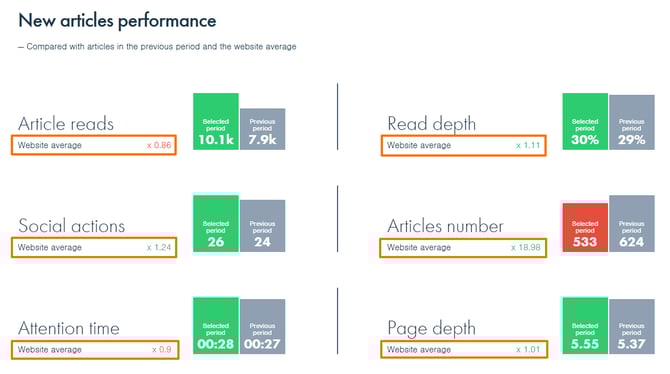
The metrics you see there are mostly based on average values per article: - Article reads - Average reads per article
- Social actions - Social actions per article
- Attention time - On average, your readers were engaged with your content for this amount of time (mm:ss)
- Read depth - Average read depth per article (%)
- Articles number - Number of articles published in the selected period
- Page depth - Per article
For definitions of the metrics above, visit: https://knowledgebase.smartocto.com/metrics-article-reads-social-actions-read-depth-page-depth-attention-time.